

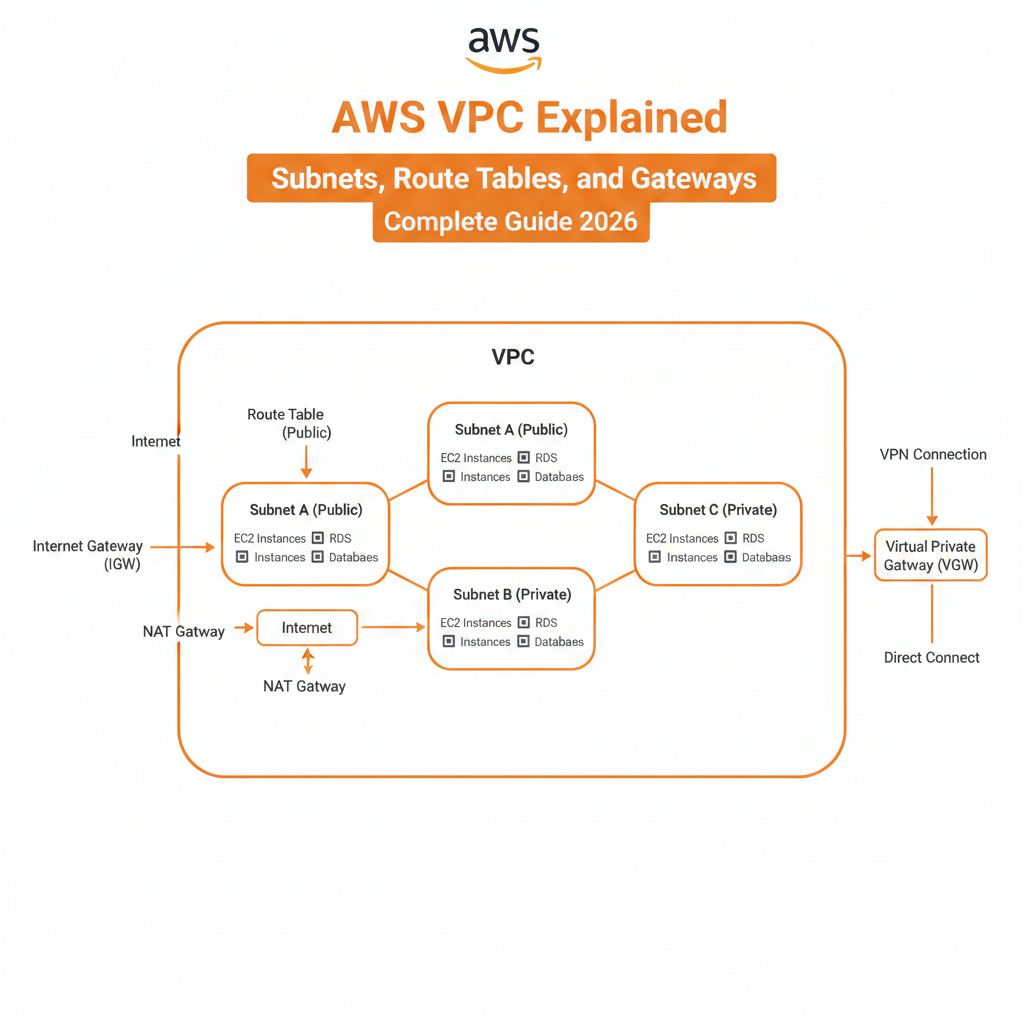

Understanding AWS Virtual Private Cloud (VPC) Fundamentals
Amazon Virtual Private Cloud (VPC) is the foundational networking service in AWS that allows you to launch resources in a logically isolated virtual network. Understanding VPC architecture is essential for building secure, scalable cloud infrastructure.
What is AWS VPC?
AWS VPC is your private section of the AWS cloud where you can define and control a virtual network environment. This includes IP address ranges, subnets, route tables, network gateways, and security settings.
Key Benefits of AWS VPC
- Complete control over your virtual networking environment
- Isolated network space for enhanced security
- Customizable IP address ranges
- Multiple connectivity options to on-premises infrastructure
- Advanced security features with security groups and network ACLs
- High availability across multiple Availability Zones
VPC Core Components
Every VPC consists of several essential components that work together to enable network connectivity and security. These include subnets, route tables, internet gateways, NAT gateways, and network access control lists.
AWS VPC Architecture Overview
Understanding the hierarchical structure of VPC components is crucial for effective network design.
VPC Hierarchy
- Region Level: VPC exists within a single AWS Region
- VPC Level: Define CIDR block and DNS settings
- Availability Zone Level: Subnets span single AZs
- Subnet Level: Resources launched in specific subnets
- Resource Level: EC2 instances, RDS, Lambda functions
Default VPC vs Custom VPC
AWS provides a default VPC in each region, but custom VPCs offer greater control and flexibility for production environments.
Default VPC characteristics:
- Automatically created in each region
- CIDR block: 172.31.0.0/16
- Default subnet in each Availability Zone
- Internet Gateway attached by default
- Suitable for testing and simple applications
Custom VPC advantages:
- Choose your own IP address range
- Complete control over network architecture
- Multiple tier separation (public/private)
- Advanced security configurations
- Better suited for production workloads
CIDR Blocks and IP Addressing in VPC
Choosing the right IP address range is the first step in VPC design.
Understanding CIDR Notation
CIDR (Classless Inter-Domain Routing) notation defines the IP address range for your VPC. For example, 10.0.0.0/16 provides 65,536 IP addresses.
Recommended VPC CIDR Ranges
AWS allows RFC 1918 private IP address ranges:
- 10.0.0.0/8: 16,777,216 addresses (10.0.0.0 to 10.255.255.255)
- 172.16.0.0/12: 1,048,576 addresses (172.16.0.0 to 172.31.255.255)
- 192.168.0.0/16: 65,536 addresses (192.168.0.0 to 192.168.255.255)
VPC CIDR Block Best Practices
- Use /16 netmask for most production VPCs (65,536 addresses)
- Avoid overlapping with on-premises networks
- Plan for future growth and multiple environments
- Document IP address allocation strategy
- Consider VPC peering requirements
Secondary CIDR Blocks
AWS allows adding secondary CIDR blocks to existing VPCs when you need more IP addresses. You can add up to 4 additional CIDR blocks per VPC.
AWS VPC Subnets Explained
Subnets divide your VPC into smaller network segments, each residing in a single Availability Zone.
What is a Subnet?
A subnet is a range of IP addresses within your VPC. Subnets allow you to group resources based on security and operational needs while distributing them across Availability Zones for high availability.
Public Subnets vs Private Subnets
Understanding the difference between public and private subnets is fundamental to VPC architecture.
Public Subnets:
- Have a route to an Internet Gateway
- Resources can receive traffic from the internet
- Instances typically have public IP addresses
- Used for web servers, load balancers, bastion hosts
- Direct internet connectivity for outbound traffic
Private Subnets:
- No direct route to Internet Gateway
- Resources cannot receive inbound internet traffic
- Used for databases, application servers, backend systems
- Access internet via NAT Gateway or NAT Instance
- Enhanced security through isolation
Subnet Sizing Strategy
Proper subnet sizing ensures efficient IP address utilization while allowing for growth.
Subnet size recommendations:
- /24 (256 addresses): Small environments, specific use cases
- /23 (512 addresses): Medium environments, good balance
- /22 (1,024 addresses): Large environments, auto-scaling groups
- /21 (2,048 addresses): Very large deployments, container workloads
AWS reserved IP addresses: AWS reserves 5 IP addresses in each subnet:
- Network address (first IP)
- VPC router (second IP)
- DNS server (third IP)
- Future use (fourth IP)
- Broadcast address (last IP)
Example: In a 10.0.1.0/24 subnet, you have 251 usable IP addresses (256 – 5).
Multi-AZ Subnet Design
Distributing subnets across Availability Zones ensures high availability and fault tolerance.
High availability architecture:
- Create subnets in at least 2 Availability Zones
- Mirror subnet structure across each AZ
- Use identical CIDR sizes for consistency
- Deploy redundant resources across AZs
- Load balance traffic between AZs
Example multi-AZ design:
VPC: 10.0.0.0/16

AZ-1 (us-east-1a):
- Public Subnet: 10.0.1.0/24
- Private Subnet: 10.0.11.0/24
- Database Subnet: 10.0.21.0/24

AZ-2 (us-east-1b):
- Public Subnet: 10.0.2.0/24
- Private Subnet: 10.0.12.0/24
- Database Subnet: 10.0.22.0/24
Subnet Best Practices
- Use consistent naming conventions (e.g., vpc-prod-public-1a)
- Tag subnets with environment, purpose, and AZ information
- Enable flow logs for network monitoring
- Document subnet allocation in network diagrams
- Reserve CIDR ranges for future expansion
- Separate application tiers into different subnets
AWS Route Tables Explained
Route tables contain rules that determine where network traffic is directed within your VPC.
What is a Route Table?
A route table is a set of rules (called routes) that determine where network packets are directed. Each subnet must be associated with a route table, which controls the routing for that subnet.
Route Table Components
Route entries consist of:
- Destination: CIDR block for target network
- Target: Where traffic should be sent (IGW, NAT Gateway, VPC Peering, etc.)
- Status: Active or blackhole (inactive)
- Propagation: Manually added or propagated from VPN
Main Route Table vs Custom Route Tables
Every VPC has a main route table that controls routing for all subnets not explicitly associated with a custom route table.
Main route table:
- Automatically created with VPC
- Applied to subnets without explicit associations
- Should be kept private (no internet gateway route)
- Acts as a safety net for new subnets
Custom route tables:
- Created for specific routing requirements
- Explicit subnet associations
- Different routes for public and private subnets
- Better security through explicit configuration
Creating Route Table Rules
Routes specify how traffic flows within and outside your VPC.
Common route types:
- Local Route (Automatic):
- Destination: VPC CIDR (e.g., 10.0.0.0/16)
- Target: local
- Purpose: Enables communication within VPC
- Cannot be modified or deleted
- Internet Gateway Route:
- Destination: 0.0.0.0/0
- Target: igw-xxxxxxxxx
- Purpose: Enables internet access from public subnets
- NAT Gateway Route:
- Destination: 0.0.0.0/0
- Target: nat-xxxxxxxxx
- Purpose: Enables internet access from private subnets
- VPC Peering Route:
- Destination: Peer VPC CIDR
- Target: pcx-xxxxxxxxx
- Purpose: Enables communication with peered VPC
- VPN Connection Route:
- Destination: On-premises CIDR
- Target: vgw-xxxxxxxxx
- Purpose: Routes traffic to on-premises network
Public Subnet Route Table Example
Destination          Target              Status
10.0.0.0/16         local               Active
0.0.0.0/0           igw-12345678        Active
This configuration allows instances to communicate within the VPC and access the internet.
Private Subnet Route Table Example
Destination          Target              Status
10.0.0.0/16         local               Active
0.0.0.0/0           nat-87654321        Active
This allows internal VPC communication and internet access through NAT Gateway.
Route Table Priority and Propagation
When multiple routes match a destination, AWS uses the most specific route (longest prefix match).
Route priority example:
- Route 1: 10.0.0.0/16 → local
- Route 2: 10.0.1.0/24 → nat-xxxxxxxx
Traffic to 10.0.1.50 uses Route 2 (more specific /24 vs /16).
Route Table Best Practices
- Create separate route tables for public and private subnets
- Use descriptive names (rtb-prod-public, rtb-prod-private)
- Document route table associations in network diagrams
- Avoid modifying the main route table
- Test route changes in non-production environments first
- Monitor route table changes with CloudTrail
- Use VPC Flow Logs to verify routing behavior
Internet Gateway (IGW) Explained
An Internet Gateway enables communication between resources in your VPC and the internet.
What is an Internet Gateway?
An Internet Gateway is a horizontally scaled, redundant, and highly available VPC component that allows communication between your VPC and the internet. It provides a target in your VPC route tables for internet-routable traffic.
Internet Gateway Characteristics
- Redundant: Built-in redundancy for high availability
- Scalable: Handles bandwidth requirements automatically
- No bandwidth constraints: No throughput limits
- One per VPC: Each VPC can have only one IGW attached
- Free: No additional charges for using IGW
How Internet Gateway Works
For instances in public subnets to access the internet, three conditions must be met:
- Attached Internet Gateway: IGW must be attached to VPC
- Route Table Entry: Route to 0.0.0.0/0 pointing to IGW
- Public IP Address: Instance must have public or Elastic IP
Setting Up Internet Gateway
Step-by-step process:
- Create Internet Gateway in VPC console
- Attach IGW to your VPC
- Update route table for public subnet
- Add route: 0.0.0.0/0 → igw-xxxxx
- Launch instances with public IP addresses
- Configure security groups for internet access
Internet Gateway Security Considerations
- Internet Gateway itself has no security groups
- Security enforced at instance level (security groups)
- Network ACLs provide subnet-level security
- Use bastion hosts to limit direct internet exposure
- Implement least privilege access rules
- Monitor traffic with VPC Flow Logs
NAT Gateway and NAT Instance
NAT (Network Address Translation) enables private subnet resources to access the internet while preventing inbound connections.
What is NAT Gateway?
NAT Gateway is a managed service that allows instances in private subnets to connect to the internet or other AWS services while preventing the internet from initiating connections to those instances.
NAT Gateway Features
- Fully managed: No maintenance required
- Highly available: Within single Availability Zone
- Scalable: Supports up to 45 Gbps bandwidth
- Simplified: No configuration complexity
- Pay per use: Charged per hour and per GB processed
NAT Gateway vs NAT Instance
NAT Gateway (Recommended):
- Managed by AWS
- Automatic scaling
- Higher availability within AZ
- Better performance (up to 45 Gbps)
- No security group management
- Automatic software updates
NAT Instance (Legacy):
- Self-managed EC2 instance
- Manual scaling required
- Single point of failure
- Performance depends on instance type
- Requires security group configuration
- Manual patching needed
- Lower cost for small workloads
NAT Gateway Architecture
Best practices for NAT Gateway deployment:
- One NAT Gateway per AZ for high availability
- Place in public subnet with internet gateway route
- Update private subnet route tables to point to NAT Gateway
- Associate Elastic IP for consistent outbound IP
- Monitor bandwidth with CloudWatch metrics
High availability setup:
Public Subnet AZ-1: NAT Gateway-1 + Elastic IP-1
Public Subnet AZ-2: NAT Gateway-2 + Elastic IP-2

Private Subnet AZ-1 → routes to NAT Gateway-1
Private Subnet AZ-2 → routes to NAT Gateway-2
Setting Up NAT Gateway
Configuration steps:
- Navigate to VPC console → NAT Gateways
- Click “Create NAT Gateway”
- Select public subnet for placement
- Allocate or select Elastic IP address
- Create NAT Gateway
- Update private subnet route table
- Add route: 0.0.0.0/0 → nat-gateway-id
- Test connectivity from private instances
NAT Gateway Pricing Considerations
NAT Gateway costs include:
- Hourly charge: ~$0.045 per hour per gateway
- Data processing: ~$0.045 per GB processed
- Data transfer: Standard AWS data transfer rates
Cost optimization tips:
- Use VPC endpoints for AWS service access
- Consolidate traffic through single NAT Gateway (if HA not critical)
- Use NAT Instance for very low-traffic workloads
- Monitor usage with Cost Explorer
- Consider AWS PrivateLink for service-to-service communication
VPC Peering Connections
VPC Peering enables private connectivity between two VPCs.
What is VPC Peering?
VPC Peering is a networking connection between two VPCs that enables routing traffic between them using private IP addresses. Resources in peered VPCs can communicate as if they’re in the same network.
VPC Peering Characteristics
- No single point of failure: No bandwidth bottleneck
- No transitive peering: Must establish direct connections
- Cross-region: Supports inter-region peering
- Cross-account: Can peer VPCs across AWS accounts
- Encrypted: Inter-region peering automatically encrypted
- Low latency: Uses AWS backbone network
VPC Peering Requirements
- Non-overlapping CIDR blocks: VPC IP ranges must not overlap
- Manual route updates: Add routes in both VPCs
- Security group references: Can reference peer security groups (same region)
Setting Up VPC Peering
Configuration process:
- Create peering connection from requester VPC
- Accept peering connection in accepter VPC
- Update route tables in both VPCs
- Add routes for peer VPC CIDR blocks
- Update security groups if needed
- Test connectivity between VPCs
Virtual Private Gateway (VGW) and VPN
Virtual Private Gateway enables secure connections between your VPC and on-premises networks.
What is Virtual Private Gateway?
A Virtual Private Gateway is the VPN concentrator on the AWS side of a Site-to-Site VPN connection. It’s attached to your VPC and enables communication with your on-premises network.
AWS Site-to-Site VPN
Site-to-Site VPN creates an encrypted connection between your VPC and on-premises data center.
VPN connection components:
- Virtual Private Gateway: AWS-side VPN endpoint
- Customer Gateway: On-premises VPN device configuration
- VPN Connection: Encrypted tunnel configuration
- VPN Tunnels: Two redundant IPsec tunnels
VPN Connection Setup
Implementation steps:
- Create Virtual Private Gateway
- Attach VGW to your VPC
- Create Customer Gateway (your device info)
- Create VPN Connection linking VGW and CGW
- Download VPN configuration file
- Configure on-premises VPN device
- Update route tables for on-premises CIDR
- Enable route propagation (optional)
AWS Client VPN
AWS Client VPN enables secure remote access for individual users to your VPC resources.
Client VPN use cases:
- Remote employee access
- Contractor access to resources
- Multi-factor authentication support
- Centralized access management
- Audit logging with CloudWatch
Transit Gateway
AWS Transit Gateway simplifies complex network topologies by acting as a cloud router.
What is Transit Gateway?
Transit Gateway is a network transit hub that connects VPCs and on-premises networks through a central gateway. It eliminates the need for complex peering relationships.
Transit Gateway Benefits
- Simplified architecture: Hub-and-spoke topology
- Scalability: Connect thousands of VPCs
- Centralized routing: Single point for route management
- Transitive routing: VPCs communicate through TGW
- Multi-region: Inter-region peering support
- Bandwidth: Up to 50 Gbps per VPN connection
Transit Gateway vs VPC Peering
Use Transit Gateway when:
- Connecting more than 3-4 VPCs
- Need transitive routing
- Centralized network management required
- Multiple on-premises connections
Use VPC Peering when:
- Connecting only 2 VPCs
- Simple point-to-point connectivity
- Minimal routing complexity
- Cost-sensitive deployments
VPC Endpoints
VPC Endpoints enable private connections to AWS services without internet gateway or NAT.
What are VPC Endpoints?
VPC Endpoints allow private connectivity between your VPC and supported AWS services without requiring an internet gateway, NAT device, VPN connection, or AWS Direct Connect.
Types of VPC Endpoints
Gateway Endpoints (Free):
- Support for S3 and DynamoDB only
- Specified as route table target
- No hourly charges
- No data processing charges
Interface Endpoints (Powered by PrivateLink):
- Support for many AWS services
- Use Elastic Network Interfaces (ENI)
- Charged per hour per endpoint
- Data processing charges apply
- Support DNS names
VPC Endpoint Benefits
- Enhanced security: Traffic stays within AWS network
- Cost savings: Avoid NAT Gateway data processing fees
- Performance: Lower latency to AWS services
- Compliance: Meet data residency requirements
- Simplified architecture: No internet gateway needed
Creating VPC Endpoints
For S3 Gateway Endpoint:
- Navigate to VPC → Endpoints
- Click “Create Endpoint”
- Select “AWS services”
- Choose “com.amazonaws.region.s3”
- Select VPC
- Select route tables to update
- Configure policy (full access or custom)
- Create endpoint
For Interface Endpoint:
- Create Endpoint → AWS services
- Select service (e.g., EC2, SNS, SQS)
- Choose VPC and subnets
- Enable private DNS names
- Configure security groups
- Create endpoint
Security in AWS VPC
Securing your VPC involves multiple layers of protection.
Security Groups
Security groups act as virtual firewalls for instances, controlling inbound and outbound traffic at the instance level.
Security group characteristics:
- Stateful: Return traffic automatically allowed
- Allow rules only: Cannot create deny rules
- Instance level: Applied to ENI
- Multiple groups: Instance can have multiple security groups
- Evaluated together: All rules from all groups are aggregated
Security group best practices:
- Use least privilege principle
- Create separate security groups per tier
- Use descriptive names and descriptions
- Reference other security groups instead of CIDR blocks
- Regularly audit and remove unused rules
- Never use 0.0.0.0/0 for SSH or RDP access
Network Access Control Lists (NACLs)
NACLs provide stateless filtering at the subnet level, adding an additional security layer.
NACL characteristics:
- Stateless: Must explicitly allow return traffic
- Subnet level: Apply to all instances in subnet
- Allow and deny rules: Can explicitly deny traffic
- Rule numbers: Evaluated in order (lowest first)
- Default NACL: Allows all traffic in and out
NACL vs Security Groups:
- NACLs: Subnet level, stateless, allow and deny rules
- Security Groups: Instance level, stateful, allow rules only
- Use both for defense in depth
VPC Flow Logs
VPC Flow Logs capture information about IP traffic going to and from network interfaces in your VPC.
Flow log levels:
- VPC level: All ENIs in VPC
- Subnet level: All ENIs in subnet
- Network interface level: Specific ENI
Flow log use cases:
- Security analysis and threat detection
- Troubleshooting connectivity issues
- Monitoring network traffic patterns
- Compliance and audit requirements
- Cost optimization analysis
VPC Best Practices and Design Patterns
Multi-Tier Architecture
Three-tier architecture example:
- Public Tier (Web Layer)
- Load balancers
- Web servers with public IPs
- Route to Internet Gateway
- Private Tier (Application Layer)
- Application servers
- No public IPs
- Route through NAT Gateway
- Data Tier (Database Layer)
- RDS databases
- Isolated subnet
- No internet access
High Availability VPC Design
HA design principles:
- Distribute resources across multiple AZs
- Deploy redundant NAT Gateways per AZ
- Use Auto Scaling for automatic recovery
- Implement Elastic Load Balancing
- Configure RDS Multi-AZ deployments
- Regular backup and disaster recovery testing
VPC Sizing and Planning
Planning checklist:
- Calculate current and future IP address requirements
- Plan for multiple environments (dev, staging, prod)
- Consider VPC peering and connection needs
- Document network architecture
- Avoid overlapping CIDR blocks
- Leave room for growth (use /16 for most VPCs)
Network Monitoring and Troubleshooting
Monitoring tools:
- VPC Flow Logs for traffic analysis
- CloudWatch metrics for bandwidth and connectivity
- VPC Reachability Analyzer for path testing
- AWS Network Manager for centralized monitoring
- Third-party tools for enhanced visibility
Cost Optimization Strategies
VPC cost optimization:
- Use VPC endpoints instead of NAT Gateway when possible
- Consolidate traffic through fewer NAT Gateways
- Use Gateway endpoints for S3 and DynamoDB (free)
- Optimize data transfer between regions
- Monitor and eliminate unused Elastic IPs
- Consider Transit Gateway for complex architectures
- Use AWS Cost Explorer for traffic analysis
Common VPC Scenarios and Solutions
Scenario 1: Public Web Application
Requirements:
- Web servers need internet access
- Database must be private
- High availability required
Solution:
- Create VPC with public and private subnets across 2 AZs
- Place Application Load Balancer in public subnets
- Deploy web servers in public subnets
- Place RDS database in private subnets
- Use NAT Gateway for private subnet internet access
- Configure security groups for proper tier isolation
Scenario 2: Hybrid Cloud Connectivity
Requirements:
- Secure connection to on-premises data center
- Private connectivity required
- Redundant connections for reliability
Solution:
- Set up Virtual Private Gateway in VPC
- Configure Site-to-Site VPN with dual tunnels
- Consider AWS Direct Connect for dedicated connection
- Enable route propagation in route tables
- Configure on-premises firewall rules
- Test failover scenarios
Scenario 3: Multi-Account Architecture
Requirements:
- Multiple AWS accounts for different teams
- Shared services (Active Directory, logging)
- Controlled network access between accounts
Solution:
- Create shared services VPC in central account
- Establish VPC peering to spoke VPCs
- Use Transit Gateway for scalable connectivity
- Implement centralized logging and monitoring
- Configure cross-account IAM roles
- Document network topology and access patterns
Conclusion: Mastering AWS VPC
Understanding AWS VPC, subnets, route tables, and gateways is fundamental to building secure, scalable, and highly available cloud architectures. Start with a well-planned network design, implement security best practices, and regularly review your architecture as your requirements evolve.
Key Takeaways
- VPCs provide isolated network environments in AWS cloud
- Subnets segment your VPC across Availability Zones
- Route tables control traffic flow within and outside VPC
- Internet Gateways enable public subnet internet connectivity
- NAT Gateways allow private subnet outbound internet access
- Security groups and NACLs provide layered security
- VPC endpoints reduce costs and improve security
- Proper planning prevents costly redesigns later
Next Steps
- Design your VPC architecture on paper first
- Start with a simple VPC in a sandbox environment
- Practice creating subnets and route tables
- Experiment with different gateway types
- Implement security groups and NACLs
- Monitor with VPC Flow Logs and CloudWatch
- Document your network architecture thoroughly
By mastering these VPC components, you’ll be well-equipped to design and implement enterprise-grade network architectures on AWS that are secure, scalable, and cost-effective.



Leave a Comment