

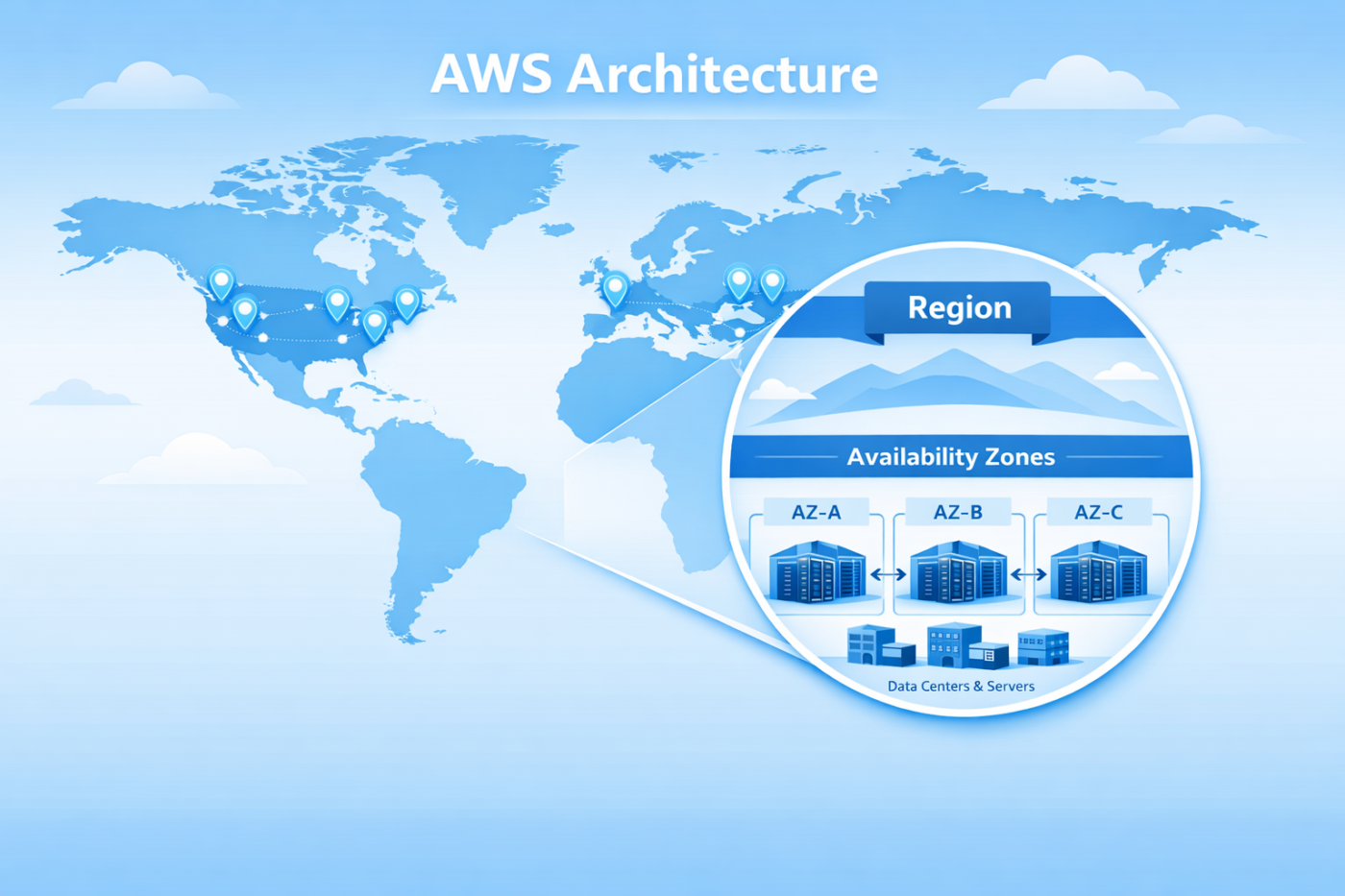

Cloud computing can sound complicated at first, but some core ideas are actually very simple. Two important concepts in Amazon Web Services (AWS) are Regions and Availability Zones (AZs). Understanding them helps you design reliable, scalable, and highly available applications.
Let’s break it down in the simplest way possible.
What is AWS?
Amazon Web Services (AWS) is a cloud computing platform provided by Amazon. It allows businesses and developers to run applications, store data, and build infrastructure without managing physical servers.
AWS has data centers all over the world, organized in a specific structure.
That structure looks like this:
Global Infrastructure
     ↓
   Regions
     ↓
Availability Zones (AZs)
     ↓
 Data Centers
🌎 What is an AWS Region?
An AWS Region is a geographical area where AWS has multiple data centers.
Important point:
👉 A country itself is NOT automatically a region.
For example:
- India is a country
- But AWS creates a region inside the country when it builds infrastructure there.
Example:
- Asia Pacific (Mumbai) is an AWS Region located in India.
Key characteristics of a Region:
- A region contains multiple Availability Zones
- Regions are physically separated
- Used to deploy applications close to users
- Helps with latency and compliance
Examples of AWS Regions:
- US East (N. Virginia)
- Europe (Frankfurt)
- Asia Pacific (Mumbai)
- Asia Pacific (Singapore)
What is an Availability Zone (AZ)?
An Availability Zone (AZ) is a separate data center (or group of data centers) inside a region.
Each AZ has:
- Independent power
- Independent networking
- Independent cooling
This means if one AZ fails, others keep running.
Example:
AWS Mumbai Region
Region: Asia Pacific (Mumbai)AZ 1 → ap-south-1a
AZ 2 → ap-south-1b
AZ 3 → ap-south-1c
Each AZ contains multiple servers and data centers.
Simple Real-World Example
Let’s use your example to understand clearly.
Step 1 — Country
India is a country, not a region.
Step 2 — AWS Region inside India
AWS creates a region called:
Asia Pacific (Mumbai)
Step 3 — Availability Zones
Inside this region there are multiple AZs:
- AZ-A
- AZ-B
- AZ-C
Each AZ contains many physical servers.
India (Country)
      ↓
AWS Region: Mumbai
      ↓
AZ-A   AZ-B   AZ-C
      ↓
Servers & Data Centers
Why Regions and AZs Matter
Regions and AZs help build highly available systems.
Benefits:
1️⃣ High Availability
If one data center fails, your application still runs in another AZ.
2️⃣ Disaster Recovery
You can replicate applications across AZs.
3️⃣ Low Latency
Deploy your application in the region closest to users.
4️⃣ Fault Isolation
Failures stay isolated within one AZ.
Example Architecture
Imagine you are hosting a web application.
A good architecture could be:
Region: Asia Pacific (Mumbai)AZ-A
  └ Web ServerAZ-B
  └ Application ServerAZ-C
  └ Database Backup
If AZ-A fails, traffic automatically goes to AZ-B.
This ensures zero downtime or minimal disruption.
FAQ: AWS Regions and Availability Zones
1. What is an AWS Region?
An AWS Region is a geographical location where AWS operates cloud infrastructure. Each region contains multiple Availability Zones (AZs) to ensure high availability and reliability.
2. What is an Availability Zone in AWS?
An Availability Zone (AZ) is an isolated data center or group of data centers within an AWS Region. Each AZ has independent power, networking, and cooling systems.
3. How many Availability Zones are in an AWS Region?
Most AWS Regions have three or more Availability Zones. This allows applications to run across multiple AZs for better fault tolerance and high availability.
4. Is a country the same as an AWS Region?
No. A country is not automatically an AWS Region. AWS decides where to create regions based on infrastructure, demand, and regulatory requirements.
5. Why do AWS Regions have multiple Availability Zones?
Multiple AZs allow applications to continue running even if one data center fails. This improves system reliability, disaster recovery, and uptime.
Join the Discussion
I recently shared this topic on LinkedIn with a visual carousel explaining AWS Regions and Availability Zones in a simple way.
If you’d like a quick visual explanation, check out the post here:
Let me know in the comments how you usually deploy applications across multiple Availability Zones.




Leave a Comment